Introducing ConnectPath SwarmControl
Live supervision for your AI agents. Watch conversations as they happen, coach the AI in real time, approve high-stakes actions, and take over when it matters—built for Amazon Connect Agentic CX Designer (ACXD) agents.
AI agents now handle real customer conversations. Amazon Connect Agentic CX Designer (ACXD) makes them easier to build; someone still has to supervise them.
Who watches the AI? Your supervisors do.
SwarmControl lives in ConnectPath at /swarmcontrol, right in the left navigation. Supervisors get the same live view and the same hands-on controls they expect for human agents, now for AI contacts.
What supervisors can do
See it. Steer it. Stop it.
Watch AI conversations live
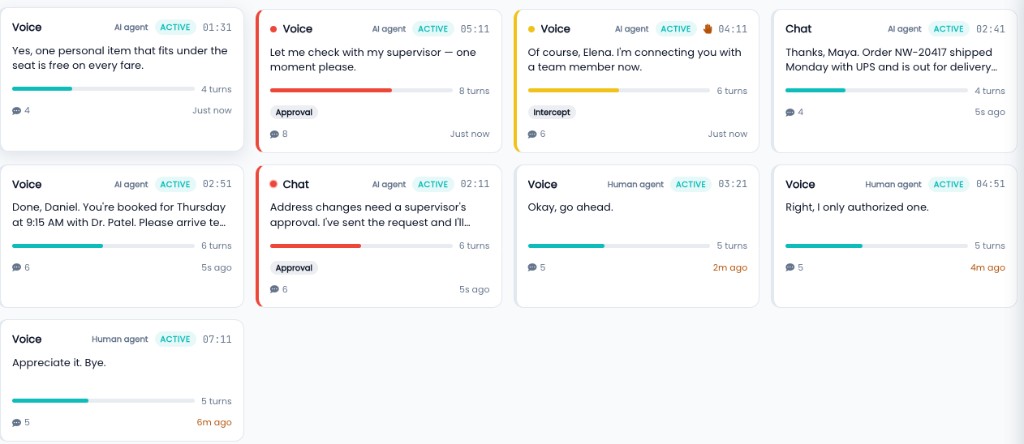
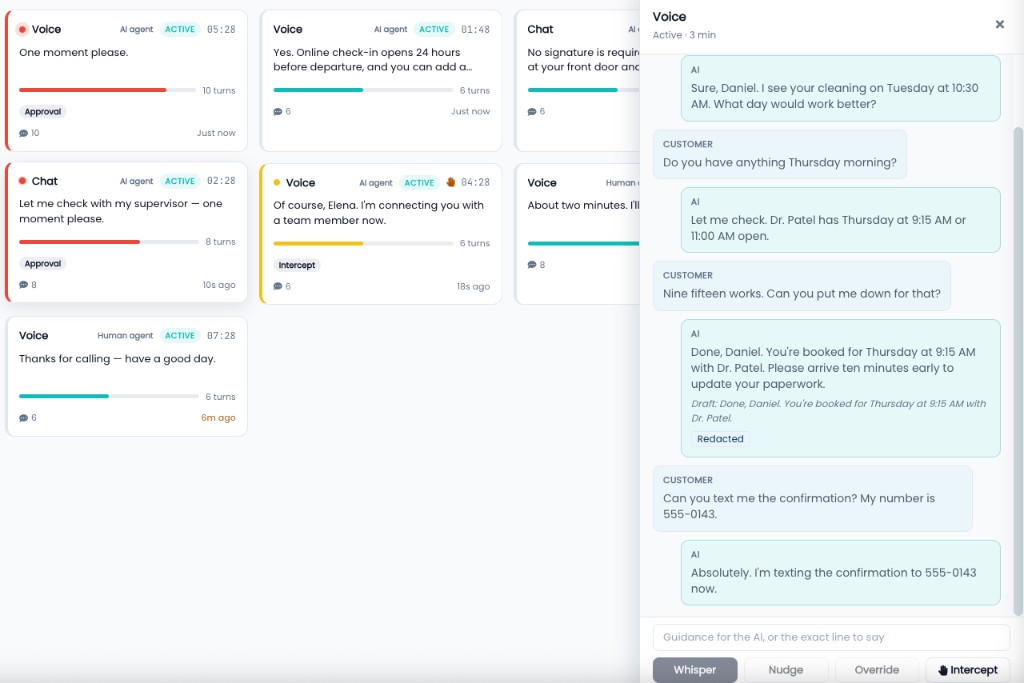
Every AI contact appears on one grid with its channel, status, and turn count. Open a contact to follow the live transcript, with Customer and AI turns side by side.
Whisper, nudge, or override
Whisper gives the AI private, light guidance. Nudge gives strong guidance it should follow. Override sets a one-time line the AI says on its next turn.
Approve before the AI acts
When an ACXD flow asks for sign-off, the contact lands in the Approvals tab. A supervisor approves or denies from there.
Intercept and hand off
Arm Intercept and the contact goes to a human on the customer's next turn. Send it to your default queue or a supervisor queue.
Four views keep the grid focused
Built for ACXD
From Agentic CX Designer to supervised in production
ACXD is Amazon Connect Agentic CX Designer. SwarmControl is how your supervisors see and steer the AI agents you design with it.
Design in ACXD
Build your AI agents and flows in Amazon Connect Agentic CX Designer (ACXD), the AWS tool for designing agentic customer experiences.
Onboard your flows
Connect your ACXD flows to ConnectPath using the data requests and Amazon Connect blocks in the setup guide.
ACXD setup guideSupervise in SwarmControl
Your AI contacts show up in SwarmControl with the same live-supervision model supervisors already use in ConnectPath.
Try it before you connect anything
SwarmControl opens in demo mode with a simulated feed, so supervisors can explore the page without any ACXD setup. Live data turns on once your ACXD flows are onboarded and an administrator enables it.
- Demo mode with simulated AI contacts is on by default
- Live data needs onboarded ACXD flows and an administrator to switch it on
- Access is controlled by security profile, like the rest of ConnectPath
Put a supervisor in front of your AI agents
Book a walkthrough and we will show you SwarmControl and what it takes to connect your ACXD flows.
Request a Demo